What is Easypaisa and Its Role in Pakistan's Digital Payments
Easypaisa, launched in 2009 by Telenor Pakistan and Tameer Microfinance Bank, is Pakistan's first and one of its largest mobile financial services (MFS) platforms. Over a decade and a half later, it has grown into a full-fledged digital payments ecosystem used by over 30 million Pakistanis. From bill payments and mobile top-ups to fund transfers, insurance, savings, and merchant QR payments — Easypaisa handles it all through a single registered mobile number.
The platform serves both banked and unbanked populations across Pakistan, enabling people in remote areas to access financial services without a traditional bank account. Easypaisa agents — numbering over 200,000 across the country — serve as the primary cash-in and cash-out points, making it one of the most accessible financial networks in the nation.
Because Easypaisa operates primarily through a mobile number (specifically a Telenor SIM), understanding the relationship between your SIM card and your digital wallet is absolutely critical for financial security.
Why SIM Verification Matters for Easypaisa Users
Your Easypaisa wallet is not just an app — it is directly anchored to a physical Telenor SIM card. This relationship creates a single point of authentication: whoever controls the SIM card controls the wallet. This is why verifying your Easypaisa SIM ownership is one of the most important steps you can take for digital financial security in Pakistan.
Consider these critical facts:
- OTP Authentication: Every Easypaisa transaction — including fund transfers, bill payments, and withdrawals — requires a One-Time Password (OTP) delivered via SMS to the registered SIM. Whoever receives that SMS can authorize transactions.
- Wallet Tied to SIM: Unlike bank accounts protected by multiple layers of authentication, Easypaisa's primary security relies heavily on SIM-level security. If your SIM is compromised, your wallet is at risk.
- CNIC Verification: Your Easypaisa account is linked to both your SIM and your CNIC. Fraudulent registration of SIMs on stolen CNICs can enable criminals to create unauthorized Easypaisa accounts.
- Legal Liability: Under Pakistan's Prevention of Electronic Crimes Act (PECA) 2016, financial fraud committed using your CNIC-registered SIM can create legal complications for you.
How Easypaisa Links Your CNIC to SIM Registration
When you open an Easypaisa mobile account, your Telenor SIM must already be biometrically registered under your CNIC through NADRA's Biometric Verification System (BVS). This creates a three-way link: CNIC ↔ Telenor SIM ↔ Easypaisa account. This integration means:
- Your Easypaisa account legally belongs to the person whose CNIC is on the SIM registration record.
- PTA and Telenor can trace any transaction back to the registered CNIC holder.
- SIM re-registration or ownership transfer automatically affects Easypaisa account status.
- Biometric verification at Easypaisa agent points confirms identity against the same NADRA database used for SIM registration.
How to Check the SIM Registered on Your Easypaisa Account
There are multiple ways to verify which SIM is linked to an Easypaisa account and to check its ownership details:
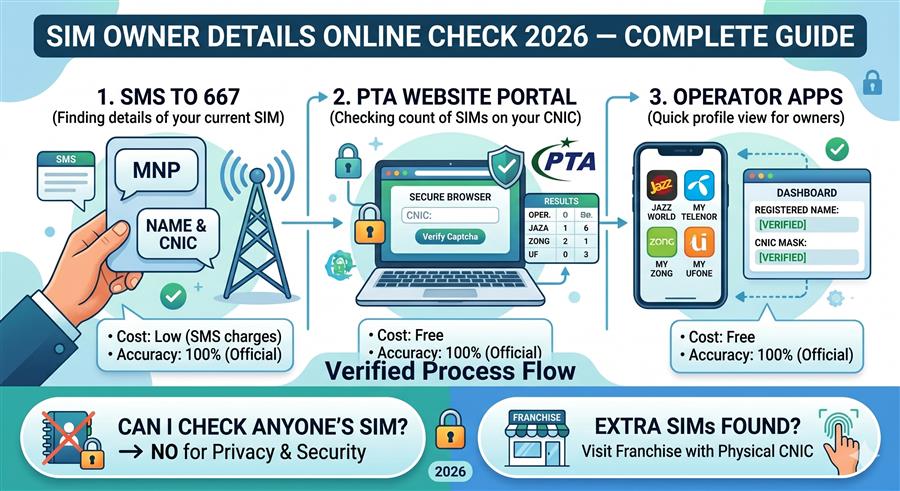
Method 1: Use SimOwner Online Portal (Recommended)
Use the search box at the top of this page. Select "Mobile Number" search mode.
Type the 11-digit Telenor number linked to the Easypaisa account (starting with 0345, 0346, 0347, 0348, or 0349).
Enter the CAPTCHA code displayed to confirm you are not an automated bot system.
The system retrieves the registered name, CNIC number, and address of the SIM owner — the same person whose Easypaisa account is linked to this number.
Method 2: Check via USSD Code (*786#)
Dial *786# from your Telenor SIM to access Easypaisa account information directly. Navigate through the menu options to view your account details including the linked mobile number and account status.
Method 3: Easypaisa App Profile Check
Open the Easypaisa mobile app → Tap on your profile icon (top left) → Go to "My Account" or "Account Details" → The linked mobile number and CNIC will be displayed under account information.
Method 4: Telenor Customer Care (345)
Call Telenor helpline 345 (free from Telenor SIM) and request SIM ownership verification. You will need to provide your CNIC number for identity confirmation.
What Happens When Your Easypaisa SIM Is Stolen or Cloned
SIM theft and cloning are among the most dangerous threats to Easypaisa users. When a criminal obtains your Telenor SIM — either physically or through a SIM swap — the consequences can be devastating:
- Immediate Wallet Access: The thief receives all OTPs and can authorize transfers, bill payments, and withdrawals from your Easypaisa balance.
- Linked Account Exploitation: If your Easypaisa account is linked to a bank account, the criminal may attempt unauthorized bank transfers.
- Personal Data Exposure: Transaction history, linked contacts, and account details become accessible to the thief.
- Agent Cash-Out: Criminals can visit Easypaisa agents and cash out the wallet balance before you can block the account.
What to do immediately if your SIM is stolen: Call Telenor helpline 345 and request an emergency SIM block. Visit any Telenor franchise with your original CNIC for a replacement SIM. Simultaneously, call the Easypaisa helpline at 3737 (from Telenor) or 0311-1003737 to freeze your wallet account.
Easypaisa SIM Swap Fraud in Pakistan: Cases and Prevention
SIM swap fraud is a growing threat across Pakistan's mobile financial sector. In a typical SIM swap attack, a fraudster:
- Collects your personal information (CNIC number, phone number, mother's name) through phishing calls, social engineering, or data leaks.
- Visits a Telenor franchise or calls customer care impersonating you, claiming their SIM is lost and requesting a replacement.
- Once a new SIM is issued with your number, your original SIM stops working and all OTPs go to the criminal's device.
- Within minutes, the criminal logs into Easypaisa and transfers or withdraws all available funds.
Prevention Measures
- Biometric SIM Lock: Visit a Telenor franchise and request biometric lock on your SIM — this prevents any SIM swap without your fingerprint present.
- Strong Easypaisa PIN: Set a unique, hard-to-guess 5-digit PIN on your Easypaisa account. Never use birthdays or CNIC digits as your PIN.
- Never Share OTPs: Easypaisa and Telenor will never ask for OTP codes over phone. Sharing OTPs with anyone is the #1 cause of wallet fraud.
- Enable App Lock: Use fingerprint or face lock within the Easypaisa app for an extra security layer.
- Monitor Transactions: Enable SMS alerts for all Easypaisa transactions and review them regularly.
How to Recover Your Easypaisa Account If SIM Is Lost
Account recovery after SIM loss follows a structured process. Here is the complete step-by-step guide:
- Block the Lost SIM: Call Telenor helpline 345 from any phone and report SIM loss. Provide your CNIC and account details. The SIM will be blocked within minutes.
- Freeze Easypaisa Wallet: Call 3737 from another Telenor number or 0311-1003737 from any network to request an account freeze.
- Visit Telenor Franchise: Go to the nearest Telenor Service Center with your original CNIC (not a photocopy). Complete biometric verification on the BVS machine.
- Get Replacement SIM: Once biometric verification succeeds, a new SIM with your original number is issued on the spot (standard SIM replacement fee applies).
- Reactivate Easypaisa: Insert the new SIM, open the Easypaisa app, and log in. Your wallet balance, linked accounts, and transaction history will all be restored automatically.
Easypaisa vs JazzCash: SIM Requirements Comparison
| Feature | Easypaisa | JazzCash |
|---|---|---|
| Parent Network | Telenor Pakistan | Jazz (Mobilink) |
| Required SIM | Telenor SIM (primary) | Jazz SIM (required) |
| CNIC Verification | Mandatory biometric | Mandatory biometric |
| SIM Swap Protection | Biometric SIM lock available | Biometric lock at franchise |
| Account Recovery | Via franchise biometric | Via franchise biometric |
| App-Only Access | Limited (full features need Telenor SIM) | Limited (full features need Jazz SIM) |
| Daily Transfer Limit | Rs. 50,000 (standard account) | Rs. 50,000 (standard account) |
| Helpline | 3737 / 0311-1003737 | 4444 / 0311-1114444 |
Step-by-Step Guide to Verifying Easypaisa SIM Ownership
Whether you suspect someone is using your CNIC to operate an Easypaisa account, or you want to verify the owner of a number that contacted you for a transaction, follow this verification process:
- Note the complete 11-digit mobile number (Telenor number starting with 034x).
- Use the SimOwner search portal above to look up the registered owner name and CNIC.
- Cross-reference the CNIC with the person you are dealing with — ask them to show their physical CNIC card.
- If the SIM is registered under a different name than the person contacting you, exercise extreme caution — this is a common indicator of fraud.
- For suspicious numbers, report to PTA at 0800-55055 or the FIA Cybercrime Wing at 9911.