What Is SIM Registration and Why It Matters in Pakistan
SIM registration is the process of legally linking a mobile SIM card to the identity documents of a specific individual. In Pakistan, this process became mandatory through PTA's directive in 2015, fundamentally transforming how mobile connectivity is governed. Every active SIM card in Pakistan must be registered against a valid Computerized National Identity Card (CNIC) through NADRA's Biometric Verification System — creating a national registry of mobile subscribers.
Proper SIM registration matters for several critical reasons:
- Legal Identity: An unregistered SIM cannot be used legally. PTA and telecom operators block all unverified SIM cards.
- Financial Services: Mobile wallet services like JazzCash and Easypaisa require properly registered SIM cards to activate accounts.
- Personal Security: Your registered SIM is your identity anchor for OTP-based authentication on banking, social media, and government services.
- Legal Responsibility: Under PECA 2016, you are legally responsible for any crimes committed using a SIM registered under your CNIC.
- Government Services: BISP payments, EHSAAS transfers, and other government disbursements are delivered through registered SIM numbers.
Pakistan's Mandatory Biometric SIM Registration: History and Background
Pakistan's biometric SIM registration campaign was one of the most ambitious telecom security initiatives in the world. Here is how it unfolded:
- Pre-2015: SIM cards were sold without strict identity verification. This led to widespread abuse — terrorists, criminals, and fraudsters used unregistered SIMs with near-total anonymity.
- 2015 Campaign Launch: Following the Army Public School Peshawar attack (December 2014), the government launched an emergency biometric re-registration campaign in January 2015. All 130+ million active SIMs had to be re-verified within 60 days.
- The Process: Subscribers visited operator franchises to scan their fingerprints, which were matched in real-time against NADRA's biometric database. SIMs that failed verification were blocked.
- Results: Over 35 million unverified SIM cards were blocked by May 2015 — the world's largest SIM card deactivation exercise. The campaign significantly reduced anonymous mobile communication used by criminal networks.
- Ongoing Enforcement: New SIM sales require biometric verification at point of sale. PTA conducts regular audits and blocks non-compliant SIMs.
How to Check If Your SIM Is Properly Registered
There are several methods to verify your SIM's registration status in Pakistan:
Method 1: SimOwner Online Search (Recommended)
Use the search box at the top of this page. Select "Mobile Number" mode.
Type your 11-digit SIM number (e.g., 03001234567) into the search field.
Enter the CAPTCHA code to verify you are human, then press Search.
Check that the returned name and CNIC match your actual identity. If details are incorrect or return an error, your SIM may not be properly registered.
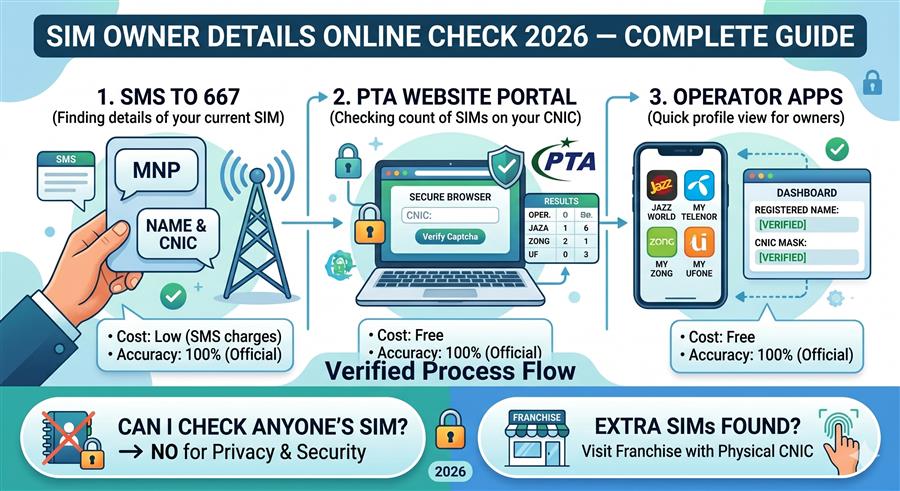
Method 2: SMS to 667
Send a blank SMS or type MNP and send it to 667 from the SIM you want to check. You will receive a reply containing the registered owner name, CNIC number, and connection type. This works for Jazz numbers. For other networks, the equivalent services are:
- Zong: Send V to 7911
- Telenor: Send blank SMS to 7421
- Ufone: Send SIM to 668
Method 3: PTA's 668 CNIC Audit
To check all SIMs registered under your CNIC (not just one specific number), send your 13-digit CNIC number without dashes to 668 from any mobile in Pakistan. You will receive a count of active SIMs across all operators registered under your identity card.
Common SIM Registration Issues and How to Fix Them
Even after the 2015 campaign, many Pakistanis encounter SIM registration issues. Here are the most common problems and their solutions:
Issue 1: SIM Shows Wrong Name or CNIC
Cause: The SIM was registered on someone else's CNIC (common if purchased second-hand, or through a proxy agent), or registration data was incorrectly entered.
Fix: Visit the operator franchise with your original CNIC. The agent will verify your fingerprint and update the registration record. If the number is registered under someone else, the current registered owner must also be present for transfer.
Issue 2: SIM Returns "Not Registered" Error
Cause: The SIM was never biometrically registered, the registration expired, or the SIM was blocked by PTA.
Fix: Go to the operator franchise with your original CNIC and the SIM. Complete biometric re-registration. If the number has been permanently deactivated and reassigned, you may need to acquire a new SIM.
Issue 3: CNIC Shows Too Many SIMs
Cause: Fraudulent agents registered additional SIMs on your CNIC without your knowledge, your CNIC was used for unauthorized registrations after loss/theft.
Fix: Visit any operator franchise for each network with unauthorized registrations and request biometric de-registration. Report to PTA at 0800-55055.
What Happens When Your SIM Is Unregistered or Blocked
An unregistered or blocked SIM card in Pakistan goes through a standard deactivation process:
- Warning Phase (Days 1-15): The operator sends SMS warnings that the SIM must be re-registered. Outgoing calls and SMS may be restricted.
- Partial Block (Days 16-30): Only incoming calls are allowed. The SIM cannot initiate calls, send SMS, or use data.
- Full Block (After 30 Days): The SIM is completely deactivated. No incoming or outgoing services function.
- Number Deallocation (After 90 Days): The mobile number is returned to the operator's number pool and may be reassigned to a new subscriber.
How to Re-Register a Blocked SIM
If your SIM has been blocked due to registration issues, follow these steps to re-register:
- Visit the nearest franchise of your SIM's network (Jazz, Zong, Telenor, Ufone, or SCOM).
- Bring your original CNIC — not a photocopy. The CNIC must be valid and not expired.
- Inform the agent you want to re-register your SIM (provide the mobile number).
- Place your thumb (or alternate finger if thumb is damaged) on the BVS device. The system will verify your identity against NADRA's database in real-time.
- Upon successful verification, the SIM is re-registered and reactivated. Services restore within 2-4 hours.
SIM Registration for Foreigners Visiting Pakistan
Foreign nationals visiting Pakistan can register local SIM cards for temporary use:
- Documents Required: Valid foreign passport (original, not photocopy).
- Available At: Designated telecom desks at Karachi, Lahore, and Islamabad international airports; major operator franchises in cities.
- Validity: Tourist SIMs are valid for 90 days from date of registration.
- Limitation: Maximum 1 SIM per network per foreign passport.
- Biometric: Fingerprint verification is still required using NADRA's foreign national biometric records.
SIM Registration for Overseas Pakistanis (NICOP/POC)
Overseas Pakistanis holding NICOP (National Identity Card for Overseas Pakistanis) or POC (Pakistan Origin Card) can register SIMs in Pakistan:
- NICOP holders use their NICOP card for registration — the process is identical to regular CNIC holders.
- POC holders (non-Pakistani origin) can register with their POC card and foreign passport together.
- All standard limits apply — maximum 5 voice SIMs and 3 data SIMs per identity card.
- Overseas Pakistanis can also manage their SIM registrations through Pakistani embassies in certain countries.
Corporate SIM Registration Process
Businesses that require SIM cards for employees, devices, or IoT applications must follow a separate corporate registration process:
- Company must be registered with SECP (Securities and Exchange Commission of Pakistan).
- Corporate SIMs are issued under the company's NTN (National Tax Number) rather than an individual's CNIC.
- An authorized representative of the company (with a board resolution and authorization letter) must be present for biometric verification.
- Corporate accounts can hold significantly more than 8 SIM connections based on business requirements and PTA authorization.
Required Documents for SIM Registration
| Registration Type | Required Documents | Biometric Required |
|---|---|---|
| Pakistani National (Prepaid) | Original CNIC (valid) | ✅ Yes (fingerprint) |
| Pakistani National (Postpaid) | Original CNIC + Bank statement | ✅ Yes (fingerprint) |
| Foreign National (Tourist) | Valid Foreign Passport | ✅ Yes (fingerprint) |
| Overseas Pakistani (NICOP) | Original NICOP card | ✅ Yes (fingerprint) |
| POC Holder | POC Card + Foreign Passport | ✅ Yes (fingerprint) |
| Corporate / Business | NTN + Board Resolution + CNIC of Rep. | ✅ Yes (authorized rep) |
| SIM Replacement (lost) | Original CNIC + Police report (FIR) | ✅ Yes (fingerprint) |
| SIM Ownership Transfer | Both parties' CNICs | ✅ Both parties biometric |