What is JazzCash and Its Importance in Pakistan
JazzCash is Pakistan's most widely used mobile financial service, operated by Jazz (formerly Mobilink), the country's largest cellular network with over 75 million subscribers. Launched in 2012, JazzCash has transformed how millions of Pakistanis send money, pay bills, receive salaries, and manage everyday financial transactions — all through their mobile phones without requiring a traditional bank account.
With over 200,000 active agents spread across urban centers and rural towns, JazzCash serves as the financial backbone for a significant portion of Pakistan's unbanked population. The platform processes billions of rupees in transactions monthly, covering services like:
- Domestic money transfers (person-to-person)
- Utility bill payments (electricity, gas, water, internet)
- Mobile top-ups for all networks
- BISP beneficiary payments and government disbursements
- Merchant payments via QR code and POS
- Microloans and insurance products
- International remittances in partnership with MoneyGram and Western Union
Because JazzCash is intrinsically linked to Jazz SIM cards, understanding the SIM–wallet relationship is essential for every JazzCash user's financial security.
How JazzCash Links to Your Jazz SIM Card
The connection between JazzCash and your Jazz SIM is not merely technical — it is legal and regulatory. Here is how the integration works:
- SIM as Identity Anchor: Your Jazz SIM must be biometrically registered under your CNIC through NADRA's BVS system. This biometric record becomes the identity foundation of your JazzCash account.
- OTP Delivery via SMS: Every JazzCash transaction — transfers, payments, PIN changes, new device logins — requires an OTP delivered via SMS to your Jazz number. This makes the SIM the primary authentication factor.
- CNIC Matching: When opening a JazzCash mobile account, the system verifies that the CNIC provided matches the CNIC registered on the Jazz SIM. Mismatches are rejected to prevent identity fraud.
- Number Portability Impact: If you port your Jazz number to another network (MNP), your JazzCash account may be suspended since the wallet requires an active Jazz SIM.
Why Checking SIM Ownership Is Critical for JazzCash Users
A JazzCash wallet is only as secure as the SIM it's tied to. There are multiple scenarios where verifying SIM ownership becomes an urgent security necessity:
- Unknown Transfers Received: If someone sends you money through JazzCash from an unknown number, checking the SIM owner's details helps verify the sender's legitimacy before accepting or reversing the transaction.
- Fraudulent Transaction Attempts: If you receive OTPs or transaction alerts for transactions you didn't initiate, your SIM may already be cloned or swapped. Immediately verify your SIM registration status.
- Business Verification: Before paying a JazzCash merchant number, verify that the number is registered to the actual business owner to avoid payment fraud.
- CNIC Audit: Check if unauthorized Jazz SIMs are registered under your CNIC — any such SIM could be linked to an unauthorized JazzCash account.
- Employee Payroll: Businesses paying salaries through JazzCash should verify that employee numbers match their declared identity documents.
JazzCash SIM Swap Fraud: Real Incidents and Prevention
SIM swap fraud targeting JazzCash users has been reported across Pakistan, with victims losing amounts ranging from a few thousand to several hundred thousand rupees. Understanding how these attacks unfold helps you protect yourself.
How SIM Swap Attacks Target JazzCash
- Information Gathering: Fraudsters obtain your CNIC number, phone number, and personal details through phishing SMS campaigns ("Congratulations! You've won Rs. 50,000 — verify your CNIC: XXXXXXXXX"), social engineering calls impersonating Jazz/JazzCash representatives, or purchased data from underground data brokers.
- Fake SIM Replacement: The criminal visits a Jazz franchise, claims their SIM (your number) is lost, and submits forged documentation or exploits a corrupt agent. They receive a new SIM with your number.
- Wallet Drain: Your original SIM stops working. The criminal receives all your OTPs and logs into JazzCash, transfers your entire balance, and cashes out at an agent.
- Disappearance: By the time you realize your SIM stopped working and contact Jazz customer care, the funds are gone and the criminal is untraceable.
JazzCash SIM Swap Prevention Checklist
- Biometric SIM Lock: Visit a Jazz franchise and request biometric lock — your number cannot be transferred without your fingerprint present at the franchise.
- Strong JazzCash PIN: Use a unique 5-digit PIN. Avoid 12345, 00000, or your birth year. Change it every 3 months.
- Device Lock on JazzCash App: Enable fingerprint or face authentication within the JazzCash app settings.
- Never Share OTPs: Jazz and JazzCash employees never ask for OTPs. Any caller requesting your OTP is a criminal — hang up immediately.
- Monitor Your SIM Signal: If your phone loses network signal unexpectedly for extended periods, immediately suspect a SIM swap and call Jazz 111.
- Regular CNIC Audit: Send your CNIC to 668 monthly to check for unauthorized SIM registrations.
How to Check SIM Linked to JazzCash (Step-by-Step)
Navigate to the search tool at the top of this page. Select "Mobile Number" as the search type.
Type the 11-digit Jazz number linked to the JazzCash account. Jazz numbers start with 0300-0309 or 0354-0357.
Complete the anti-bot CAPTCHA challenge to proceed with the lookup.
The registered name, CNIC, and address of the Jazz SIM owner will be displayed. This is the legal owner of the associated JazzCash account.
Alternative: Check via Jazz USSD Code
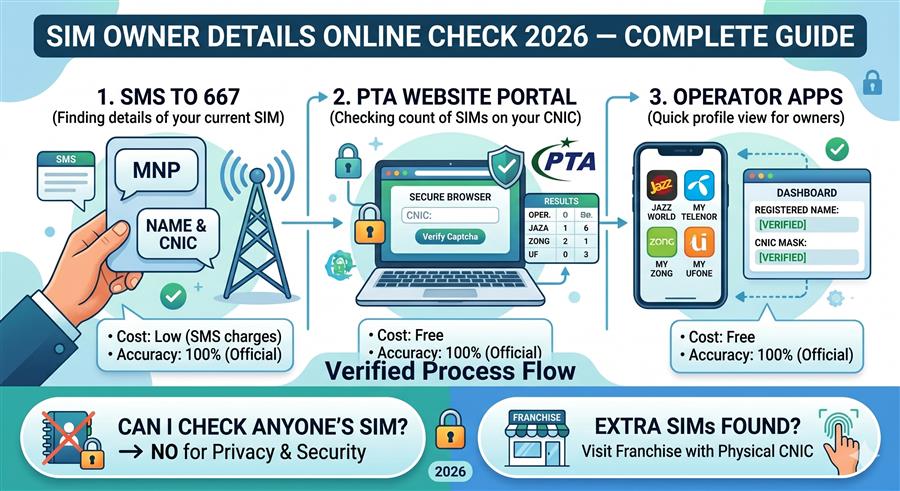
Dial *99# from your Jazz SIM to confirm your own Jazz number. To check registered owner details of the SIM currently in your phone, send a blank SMS or the word MNP to 667. You'll receive a reply with the registered owner name, CNIC, and connection type.
How to Secure Your JazzCash Account
Beyond SIM security, these account-level protections significantly reduce your risk of fraud:
- Two-Factor Settings: In JazzCash app settings, ensure transaction confirmation requires both PIN and biometric (fingerprint or face scan).
- Trusted Device Registration: Register only your personal, password-protected device as a trusted device. Deregister any old or lost phones immediately.
- Transaction Alerts: Enable SMS and push notifications for every transaction. Review any alert that you didn't initiate and immediately call 4444 if suspicious.
- Withdraw Limits: Set a custom daily transaction limit below the maximum in your JazzCash app settings to minimize potential loss in case of fraud.
- Link to Bank Account Carefully: Only link your JazzCash wallet to a bank account you actively monitor. Review inter-account transfers regularly.
What to Do If Your JazzCash SIM Is Unauthorized
If your CNIC check reveals a Jazz SIM registered under your CNIC that you don't own — and this SIM could be linked to an unauthorized JazzCash account — take these immediate steps:
- Note the unauthorized number from the 668 SMS response.
- Visit a Jazz Experience Center or franchise with your original CNIC.
- Complete biometric verification and request de-registration of the unauthorized SIM.
- Once the SIM is blocked, contact JazzCash at 4444 or 0311-1114444 and report the unauthorized account.
- File a complaint with PTA at 0800-55055 and the FIA Cybercrime Wing at 9911 if financial fraud has occurred.
- If funds were stolen, file a First Information Report (FIR) at your local police station citing the unauthorized SIM number and your CNIC.
JazzCash Security Features Comparison
| Security Feature | Availability | How to Activate |
|---|---|---|
| Biometric SIM Lock | ✅ Available | Visit Jazz franchise, request BVS lock |
| JazzCash App PIN | ✅ Default | Set during account activation |
| Fingerprint App Login | ✅ Available | JazzCash app → Settings → Security |
| Transaction SMS Alerts | ✅ Default | Automatically active on Jazz SIM |
| Custom Transaction Limits | ✅ Available | JazzCash app → Account → Set Limits |
| Trusted Device Lock | ✅ Available | JazzCash app → Device Management |
| CNIC Audit (668 SMS) | ✅ Available | Send CNIC to 668 from any mobile |
| Emergency Account Freeze | ✅ Available | Call 4444 or 0311-1114444 |
JazzCash Account Recovery Process
Losing access to your JazzCash account — whether due to SIM loss, forgotten PIN, or device change — requires a structured recovery process:
- Block the Compromised SIM: Call Jazz helpline 111 from any phone and report the situation. Request immediate SIM block.
- Freeze JazzCash Wallet: Call 4444 (from Jazz) or 0311-1114444 (any network) and request an account freeze. Provide your CNIC and registered number.
- Visit Jazz Franchise: Bring your original CNIC. Complete biometric fingerprint verification. A replacement SIM with your original number is issued within minutes.
- Restore JazzCash App: Install or open JazzCash app on your phone. Log in using your Jazz number and complete OTP verification on your new SIM.
- Reset PIN if Needed: If you forgot your PIN, use "Forgot PIN" option and follow the SMS-verified reset process.
- Review Transactions: Once restored, review your transaction history for any unauthorized activity during the period of SIM loss.