Complete Guide to Submitting a SIM Block Request in Pakistan
In Pakistan's digital landscape, a stolen identity document or an unscrupulous franchise agent can result in SIM cards being registered on your CNIC without your knowledge or consent. Under the Prevention of Electronic Crimes Act (PECA) 2016, you are legally accountable for any criminal activity conducted through a mobile number registered under your identity. This makes submitting a SIM block request one of the most critical digital security actions you can take. Whether your phone was stolen, your CNIC was compromised, or you discovered unauthorized SIMs via a CNIC SIM check, this comprehensive guide walks you through every available method to block SIM cards in Pakistan swiftly and effectively.
When Do You Need to Submit a SIM Block Request?
There are several critical situations that demand immediate SIM blocking action in Pakistan:
- Lost or Stolen Phone: If your mobile handset is stolen, the thief has direct access to your SIM card and all OTP-based financial accounts linked to it. Immediate blocking prevents unauthorized bank transactions, JazzCash/EasyPaisa access, and WhatsApp account takeovers.
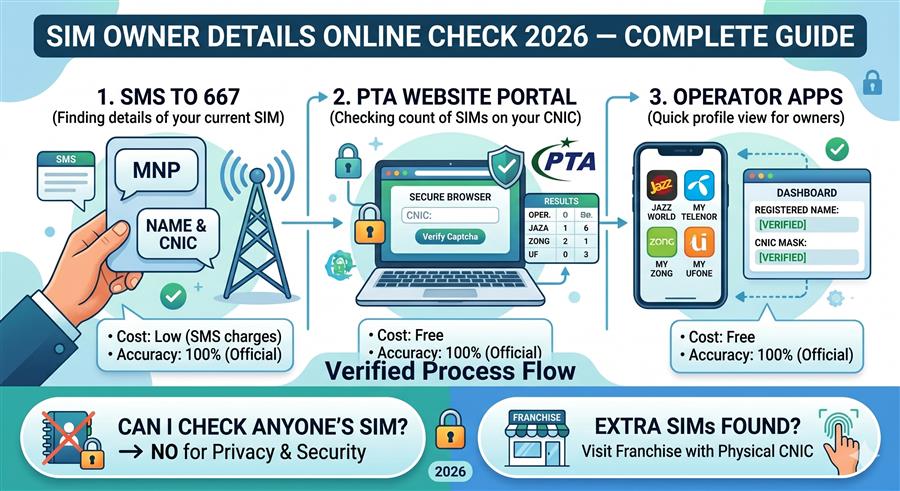
- Unauthorized SIM Registration: When you check SIMs registered on your CNIC (by sending your CNIC number to 668) and find numbers you never purchased, those are fraudulent registrations requiring immediate blocking.
- Stolen CNIC: A stolen national identity card can be misused at franchise points to register new SIM cards. File an FIR with police immediately and then block any resulting connections.
- Identity Theft Suspicion: If you receive unexpected OTP messages, verification codes, or telecom activation confirmations via SMS, someone may be using your identity for SIM registration.
- Deceased Person's SIMs: SIM cards registered on a deceased person's CNIC must be formally deregistered to prevent misuse by third parties.
- Employee Corporate SIM Return: When an employee leaves a company, their corporate-issued SIM must be blocked or transferred to prevent unauthorized usage of company resources.
Method 1: Block Through Operator Franchise (Most Reliable)
Visiting your telecom operator's official franchise is the most reliable and quickest method to block a SIM card in Pakistan. This method requires biometric verification, which ensures the block is processed immediately and officially recorded in the operator's subscriber database.
Find an official Jazz Experience Center, Telenor Sales & Service Center, Zong Customer Care Center, or Ufone UCenter in your city. Avoid unauthorized retailers — only official franchises can process block requests.
Carry your original Computerized National Identity Card. The franchise agent cannot process any block request without verifying your identity. Photocopies are not accepted for biometric verification.
Inform the representative about the specific numbers you want blocked. If you don't know which numbers are fraudulent, ask them to pull all SIM registrations under your CNIC and identify the unfamiliar ones.
Place your fingerprint on the BVS (Biometric Verification System) device. Your fingerprint is cross-checked against NADRA's database. Upon successful verification, the block request is submitted to the system.
The franchise agent will provide you with a reference number or written confirmation. The SIM is typically blocked within 2 to 24 hours. You can call the operator's helpline to confirm the block status.
Method 2: Block via PTA Portal (complaints.pta.gov.pk)
The Pakistan Telecommunication Authority provides an online consumer complaint portal where you can formally request a SIM block. This method is particularly useful if you cannot visit a franchise in person or want a documented paper trail of your complaint.
- Open your browser and navigate to complaints.pta.gov.pk.
- Create a new account using your CNIC number and a valid email address, or log in if you already have an account.
- Click "New Complaint" and select the category "Unauthorized SIM Registration" or "SIM Block Request."
- Enter the mobile number(s) to be blocked, provide your CNIC details, and upload supporting documents if available (FIR, police report, etc.).
- Submit the complaint. You will receive a complaint tracking number via email and SMS.
- PTA forwards the complaint to the relevant telecom operator, which must respond and take action within 24–72 hours.
- Track your complaint status using the reference number on the PTA portal.
You can also reach PTA's consumer protection wing through their toll-free helpline: 0800-55055, available Monday to Friday from 9 AM to 5 PM.
Method 3: Call Operator Helplines
For an immediate, telephonic SIM block request, call the customer support helpline of the relevant network operator. Note that telephonic blocks may require additional identity verification steps and may take longer to process than franchise visits:
| Operator | Customer Helpline | Processing Time |
|---|---|---|
| Jazz (Mobilink) | 111 | 2–24 hours |
| Telenor Pakistan | 345 | 2–24 hours |
| Zong (CMPAK) | 310 | 2–48 hours |
| Ufone (PTCL) | 333 | 2–24 hours |
| SCOM (SCO) | 1218 | 24–72 hours |
When calling, have your CNIC number, the mobile number to be blocked, and your registered address ready. The helpline agent will verify your identity through security questions before proceeding.
Method 4: FIA Cybercrime Complaint for Fraudulent SIMs
If the unauthorized SIM registration is part of a broader identity theft scheme or financial fraud, you should simultaneously file a complaint with the Federal Investigation Agency (FIA) Cybercrime Wing. The FIA has authority to investigate cases involving PECA 2016 violations, including unauthorized SIM registration and associated financial crimes.
- Online: Visit complaint.fia.gov.pk to file a cybercrime complaint online. Select "Cyber Harassment / Identity Theft" as the category.
- In Person: Visit your nearest FIA Cybercrime Circle office. Bring your CNIC, the police FIR (if filed), and any evidence of fraud (bank statements, call records, etc.).
- Helpline: Call 9911 — the FIA Cybercrime reporting helpline available 24/7.
Documents Required for SIM Block Request
Depending on the method you choose, the following documents may be required:
- Original CNIC: Mandatory for all methods. Must be valid and not expired.
- Police FIR: Required if CNIC was stolen. Strengthens your legal case and expedites processing.
- Death Certificate: Required when blocking SIMs on a deceased person's CNIC, along with NADRA-issued Family Registration Certificate (FRC).
- Corporate Authorization Letter: Required for corporate SIM blocks, along with official company stamp and authorized signatory's CNIC.
- Court Order: In disputed ownership cases, a court order may be required for forced de-registration.
How to Verify a SIM Has Been Successfully Blocked
After submitting your block request, verify the action was completed using these methods:
- SMS to 668: Send your 13-digit CNIC number to 668. The reply will show updated active SIM counts. If the blocked number no longer appears, the block was successful.
- Call the Helpline: Call the operator's helpline and request a status check using your reference/complaint number.
- Try Calling the Number: Attempt to call the blocked number from another phone. If it gives an "out of service" or "invalid number" message, the block is confirmed.
- SimOwner Check: Use our SIM owner details lookup to search the number — blocked SIMs typically show inactive status in the PTA database.
SIM Block for Deceased Person — Special Procedure
When a mobile subscriber passes away, their SIM cards remain active and potentially vulnerable to misuse. Pakistani law requires next of kin to formally deregister these connections. The process involves:
- Obtain the deceased's original CNIC (or certified copy) and an original death certificate from NADRA or Union Council.
- Get a Family Registration Certificate (FRC) from NADRA to establish your relationship to the deceased.
- Visit the relevant operator's franchise with your own CNIC, the documents above, and complete the biometric verification using your own fingerprint.
- Request deactivation of all SIM cards registered on the deceased's CNIC. The operator will cross-check against their subscriber database.
- If the deceased had SIMs on multiple networks, repeat the process at each operator's franchise separately.
Corporate SIM Block Procedures
Organizations managing bulk SIM registrations (corporate postpaid connections) follow a different block procedure. To block corporate SIMs:
- The designated Corporate Account Manager (CAM) must submit a formal written request on company letterhead.
- Include the list of specific numbers to be blocked, the account number, and the authorized signatory's signature with company stamp.
- Visit the operator's corporate customer service desk with the authorization letter and your personal CNIC.
- Corporate SIM blocks typically take 24–48 hours as they go through a separate backend process from consumer-level blocks.
- Request a written confirmation and updated corporate account statement showing the blocked numbers.
Difference Between SIM Blocking and SIM Porting
Many users confuse these two distinct telecom processes. Here is a clear comparison:
| Feature | SIM Blocking | SIM Porting (MNP) |
|---|---|---|
| Purpose | Permanently deactivates the number | Transfers number to another network |
| Number Status | Becomes inactive/dead | Remains active on new network |
| Reversibility | Can be reactivated with documentation | Permanent transfer unless ported back |
| SIM Status Required | Can be active or inactive | Must be active to initiate port |
| Use Case | Security, fraud prevention | Better pricing, coverage, service |
| Timeline | 2–24 hours | 24–72 hours |